Guide
How to log weightlifting sets on Apple Watch
Use a lifting app with a watch app that shows the current set, lets you adjust weight and reps, and runs the rest timer on your wrist. Plan the workout on your phone before you train, then log each set on the watch as soon as you rack the weight. Wear the band snug and a little above the wrist bone for a better heart rate reading, and treat the calorie estimate as rough. Leave building workouts and reviewing history to the phone.
Why log from the wrist
Between sets you have a minute or three, chalky hands and often a phone in a bag across the gym. A watch keeps the log on your body:
- Fewer distractions. Logging a set on the watch takes a few seconds and doesn't pull you into messages or social apps.
- A rest timer you can feel. A tap on the wrist when rest is over is easier to notice than a sound across a loud gym.
- Log it while you remember it. Entering reps right after the set is more accurate than catching up at the end of the session.
- Heart rate in the background. A workout session on the watch records heart rate while you train.
What the watch is bad at for lifting
A watch is a good logging remote. It is not a full training app on its own, and its sensors were not designed around barbells.
Small screen work
Building a program, swapping exercises, reading exercise instructions and comparing this week with last month are all easier on a phone. Do that before or after the session.
Heart rate during lifting
Apple says the heart rate sensor gives better results with rhythmic movement, such as running or cycling, than with irregular movement, like tennis or boxing [1]. Lifting is closer to the second kind: short efforts, a tight grip and a bent wrist. In a lab study of eight wearables during cycling and resistance exercise, heart rate was increasingly underestimated as intensity rose, across all devices [3]. Apple also lists tattoos and exercising in the cold as things that can affect readings [1].
Calories
In the same study, no device tested gave a valid estimate of energy expenditure during resistance exercise [3]. Use the watch's calorie number as a rough indicator at most. Don't eat back exercise calories based on it. Your bodyweight trend is a better guide (see tracking macros when you lift).
A workout type is not a set log
Apple's Workout app has workout types for Traditional Strength Training and Functional Strength Training [4]. A workout type records the session as a whole. To see sets, reps and load next time, you need a lifting app that stores each set. Many people use both: a lifting app for the log and a workout session for heart rate and activity.
Before you get to the gym
- Plan the session on your phone. Pick the exercises, set counts and rep targets so the watch only has to show the next set.
- Check the watch app is installed and paired. Open it once at home so you're not troubleshooting between sets.
- Charge the watch. A long session with heart rate running is no time for a low battery.
- Add a complication. If your lifting app offers one, a rest timer or current-workout complication on your watch face saves an app launch.
During the workout
- Start the session. Start from the phone or the watch, depending on what your app supports.
- Log right after you rack the weight. Confirm or adjust the weight and reps, then mark the set done. If you missed a rep, log what you actually did. Your next decision depends on it (see progressive overload).
- Keep warm-ups separate. If your app supports set types, mark warm-ups so they don't inflate working volume.
- Let the rest timer run on your wrist. Add time or skip it rather than restarting it on your phone.
- Record effort if you track it. Reps in reserve (RIR) after your last working set is quick to enter on a watch and useful later.
- Finish on the watch, review on the phone. Check the summary for typos while the session is fresh.
Getting a better heart rate reading
- Wear it snug. Apple says the back of the watch needs skin contact, and suggests tightening the band for workouts and loosening it afterwards [2].
- Move it up the arm. Apple recommends wearing the watch above the wrist bone, towards the elbow [2]. It can also keep the watch clear of a bent wrist on pressing movements.
- Use a chest strap if heart rate matters to you. Apple notes you can pair Apple Watch with external heart rate monitors such as Bluetooth chest straps [1]. In the study above, the chest strap was among the devices with valid heart rate during resistance exercise [3].
- Don't over-read single numbers. Even in ideal conditions, Apple says the watch may not get a reliable reading every time for everybody [5].
Wearables are not medical devices [3]. If you have a heart condition or have been told to keep your heart rate in a certain range, ask your doctor how to monitor it during training.
How the Apex Stacked watch app works
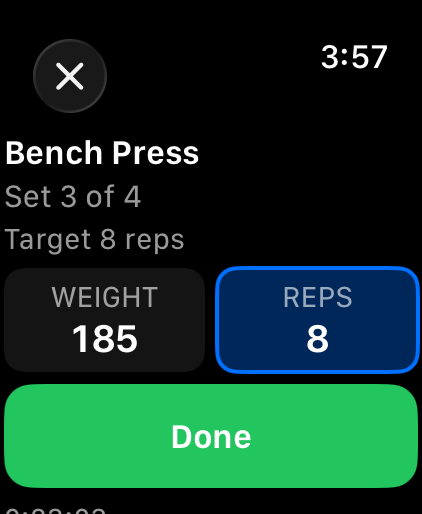
Apex Stacked has an Apple Watch app that mirrors the live workout on your iPhone. Anything you do on the wrist is applied on the phone as if you had tapped it there.
- Log each set. See the set and its target reps, adjust weight and reps with the Digital Crown, and tap Done. Warm-up sets and supersets are labeled.
- Rest timer. Rest starts on your wrist when a set is done. Skip it or add 15 seconds.
- Reps in reserve. When the phone would ask for RIR, the watch asks "Reps in reserve?" so you can answer without picking up your phone.
- Heart rate. The watch runs a workout session while you train, which shows live heart rate and keeps the app open with your wrist down.
- Start today's plan. If you have a planned workout today, the watch shows it with a Start button.
- Finish. Finish saves the workout through your iPhone. A "Workout saved" notification on the phone opens your summary.
- Dropped connections. Taps on the watch are stored on the watch until the phone confirms it has them, so a dropped connection doesn't lose a set.
- Complications. A rest countdown, the workout in progress, or your next planned workout on your watch face.
- Beyond the workout. Quick-log water, a mood, energy and stress check-in, and today's doses, and see your running competition with friends.
Saving watch workouts to Apple Health is off by default. When you turn it on, a workout run on the watch is saved as one Traditional Strength Training workout. Nothing on the watch uses AI.
Every watch feature is free on every plan. The watch app needs Apex Stacked on an iPhone and watchOS 10 or later. Starting today's planned workout from the watch needs a plan, and training plans need Apex Pro ($2.99 a month or $24.99 a year). On the free plan, start a workout on your iPhone and log it from your wrist. Apex Stacked on Android has no watch app. See Apple Watch and pricing.
Sources
- Apple Support. Get the most accurate measurements using your Apple Watch. Accessed October 18, 2026.
- Apple Support. Wearing your Apple Watch. Accessed October 18, 2026.
- Boudreaux BD, et al. Validity of wearable activity monitors during cycling and resistance exercise. Medicine & Science in Sports & Exercise, 2018.
- Apple Support. Workout types on Apple Watch. Accessed October 18, 2026.
- Apple Support. Monitor your heart rate with Apple Watch. Accessed October 18, 2026.