ApexStacked
Home / Features / Apple Watch

Apple Watch

Your workout, on your wrist.

The Apex Stacked Apple Watch app runs your lifting session from the wrist. Log each set, run the rest timer, record RIR and finish, while your iPhone keeps the data. Every watch feature is free.

Needs Apex Stacked on iPhone and watchOS 10.0 or later.

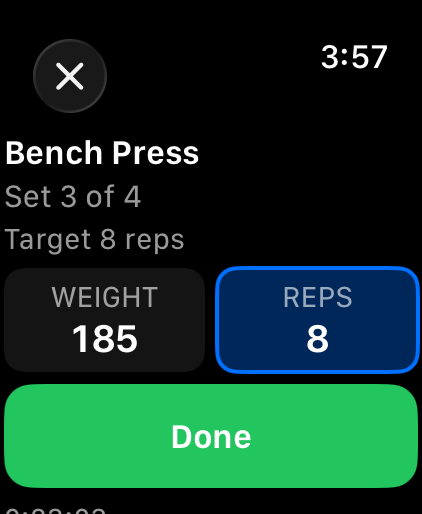
Apex Stacked on Apple Watch during a workout: Bench Press, set 3 of 4, target 8 reps, weight 185 and reps 8, with a Done button

On the watch

The live workout, today's plan, quick logging and your competition, without taking out your phone.

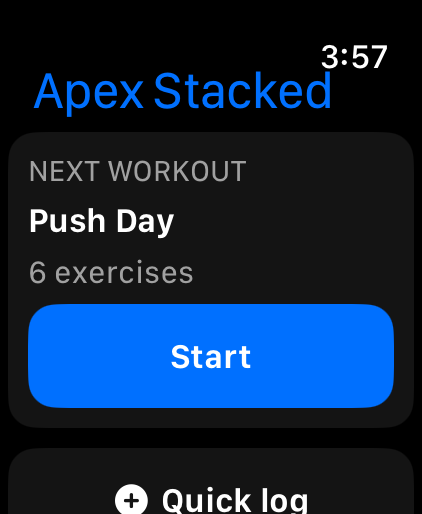
Apex Stacked watch home: next workout Push Day, 6 exercises, a Start button and Quick log
Start today's planned workout
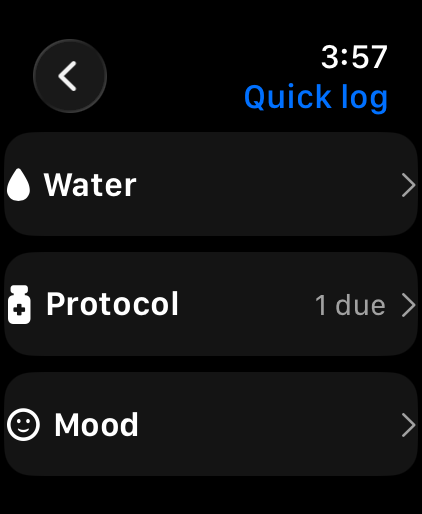
Apex Stacked watch Quick log menu with Water, Protocol (1 due) and Mood
Quick log water, doses and mood
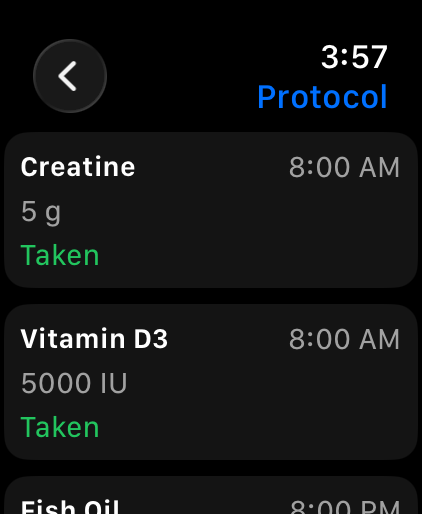
Apex Stacked watch Protocol list: Creatine 5 g and Vitamin D3 5000 IU marked Taken at 8:00 AM, Fish Oil at 8:00 PM
Mark today's doses taken
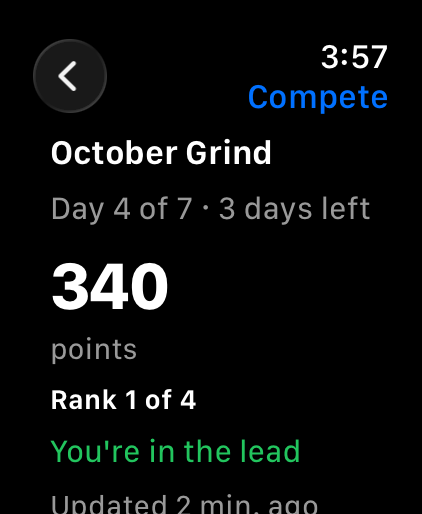
Apex Stacked watch Compete view: October Grind, day 4 of 7, 340 points, rank 1 of 4, You're in the lead
Check your competition

Run the live workout

The watch mirrors the session on your iPhone. Anything you do on the wrist is applied on the phone exactly as if you had tapped it there.

Log each set

See the set and its target reps, adjust weight and reps with the Digital Crown, and tap Done. Warm-up sets and supersets are labeled.

Rest timer

Rest starts on your wrist when a set is done. Skip it or add 15 seconds.

Reps in reserve

When the phone would ask for RIR, the watch asks "Reps in reserve?" so you can answer without picking up your phone.

Heart rate

The watch runs a workout session while you train, which shows your live heart rate and keeps the app open with your wrist down.

Start today's plan

If you have a planned workout today, the watch shows it with a Start button. The "Ready to hit it hard?" energy check is asked on the wrist too.

Finish

Finish saves the workout through your iPhone, the same way its own Finish button does. A "Workout saved" notification on the phone opens your summary.

Quick log and compete

Water

Log water in 4 oz steps, starting at 8 oz.

Mental check-in

Mood, energy and stress, each on a three-step scale.

Today's doses

Mark each dose scheduled today as Taken or Skip. Logged the same way as the Health tab on your phone.

Your competition

See your running competition, your points, your rank and who leads. It is as current as the last time you opened Compete on your iPhone. Competitions are created and joined on the phone. Competitions

Complications

Add Apex Stacked to a watch face in circular, rectangular, inline or corner styles.

Rest countdown

A running rest timer counts down on your watch face.

Workout in progress

The name of the workout you're doing.

Next workout

Your next planned workout when nothing is running.

Private on the wrist

Apple Health, and no AI

Apple Health is opt-in

"Save Apple Watch workouts to Apple Health" is off by default, under Settings, Train on your iPhone. When it is on, a workout run on the watch is saved as one Traditional Strength Training workout. When it is off, nothing reaches Apple Health. The Finish screen tells you which.

No AI on the watch

Nothing on the watch uses AI. Finishing saves the workout through your phone and offers the summary there.

Is it right for you?

A good fit if you lift with an iPhone and an Apple Watch and want to log sets and rest without picking up your phone between sets.

Maybe not if you use Android or Wear OS, want a watch app that works without an iPhone, or want a GPS running tracker. Workouts are started on the iPhone, or from the watch when you have a planned workout today.

Questions

Is the Apple Watch app free?

Yes. Every watch feature is available on every plan, including the free one. Starting today's planned workout from the watch needs a plan, and training plans need Apex Pro. On the free plan, start your workout on your iPhone and log it from your wrist.

Does it work without my iPhone?

No. The watch app is a companion to Apex Stacked on iPhone. Your iPhone keeps all your data and the watch shows what the phone sends it. Taps on the watch are stored on the watch until the phone confirms it has them, so a dropped connection doesn't lose a set.

Does it save workouts to Apple Health?

Only if you turn it on. Save Apple Watch workouts to Apple Health is off by default, under Settings, Train on your iPhone. When it is on, a workout run on the watch is saved to Apple Health as one Traditional Strength Training workout. Workouts logged only on the iPhone are never written.

Is there a Wear OS or Android watch app?

No. The watch app is for Apple Watch paired with an iPhone. Apex Stacked on Android has no watch app.

Which watchOS version do I need?

watchOS 10.0 or later, with Apex Stacked installed on your iPhone.

Will my protocol show on my watch face?

No. Complications never show protocol information. While the app lock is engaged, the watch hides today's doses entirely, and with discreet notifications on, each dose is shown only as Dose, with no name, amount or time.
More in Apex Stacked