Training plans
Apex Pro builds your workout plan every week around your split, schedule, equipment and session length, then sets the weight for each lift from what you logged. It all runs on your phone, with no AI. $2.99 a month or $24.99 a year.
iPhone and Android. Training plans need Apex Pro.

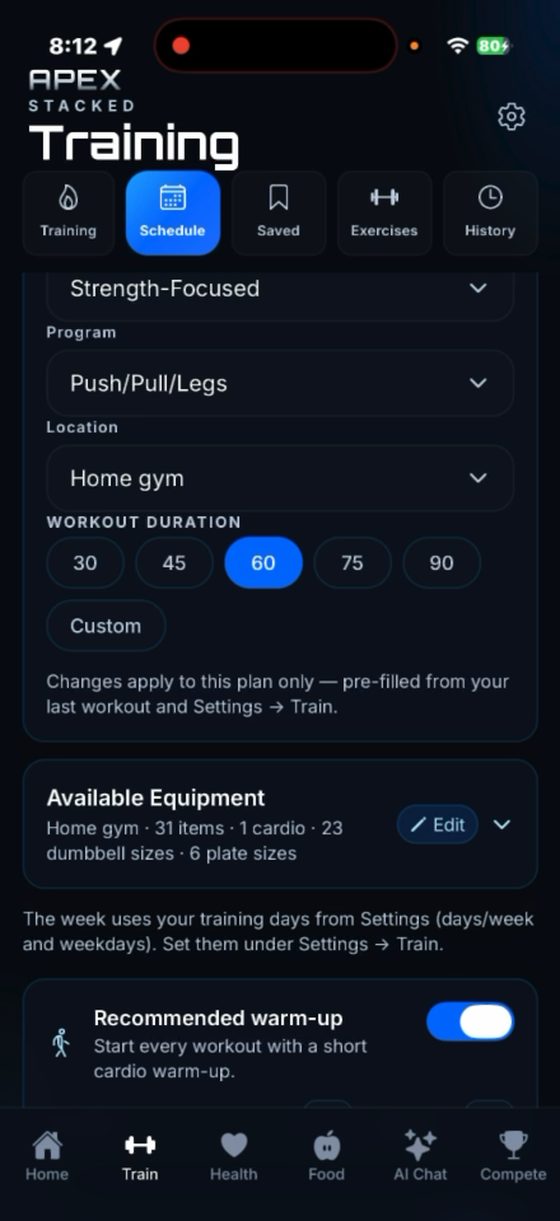
Set these once in Settings, then change any of them for a single plan when you need to.
Push/Pull/Legs, Upper/Lower, Full Body, Bro Split or Core. Push/Pull + Distributed Legs is there too once you switch it on.
The week uses how many days you train and which weekdays you pick, so sessions land on the days you can train.
Home gym, full gym or hotel gym, each with its own equipment, dumbbells, plates and bar weight. Workouts only use gear you have at that location.
30, 45, 60, 75 or 90 minutes, or a custom length. The plan fits the work to the time.
Recomp, Build muscle, Build strength, Fat loss / Cut, General fitness or Deload.
Balanced, Strength-Focused, Muscle-Building, Muscle-Focused, Muscle Retention, Conditioning or Strength Retention. The choices offered depend on your goal.
Apex Pro plans the load for every lift in the week from your own history, and tells you why the week looks the way it does.
Each planned lift shows its load and how it changed from last time. Top the rep range and the next load goes up one step, using the weights you own. Otherwise the load holds and you chase reps.
When your logged training shows built-up fatigue, the app asks "Time for a deload?" and builds a lighter week if you tap Start deload week. A deload lowers the load and pauses progression.
Open it on the plan setup screen to see the sets each muscle gets, the training emphasis in use, and which muscles are lighter today.
Before a planned session, "Ready to hit it hard?" lets you pick "Take it easy today": a little more rest, one fewer set on accessories, and no burnout finisher. Worked out on your phone, instantly.
If a workout can't be built from your gear, a sheet shows what isn't covered and the simplest fixes first, with a link straight to your equipment settings.
Turn on the recommended warm-up and every workout starts with a short cardio warm-up.
"Create For" decides what gets built.
Regenerate just today's session in your current week, or start this week if you don't have one yet.
Rebuild the whole current week. Days you've already logged are kept and stay marked as done.
Build a fresh plan for next week ahead of time.
Reusable workouts with their own warm-up. Start one any time and its next weights come from progressive overload. Tag it to a program day and the planner can use it in your weeks.
Free up to 4 · Pro no limitPut a saved workout or a rest day on each day from Sunday to Saturday, then use the week for this week or next week.
Apex ProMake one of your saved weeks your program, and it repeats week after week instead of a generated plan.
Apex ProThere is no free training plan. Logging stays free with no time limit.
Already on Pro? The Apex AI add-on is $5.99 a month with a 7-day free trial. If you cancel, the weeks you already built stay open; you just can't build new ones. Full details on pricing.
A good fit if you lift weights, want each week laid out around your schedule and gear, and want the loads worked out for you without paying for AI.
Maybe not if you want a free plan, a program written by a human coach, or a running plan. To follow a published program set for set, you would enter it yourself as saved workouts and a saved week.
No. Building a training plan needs Apex Pro, which is $2.99/month or $24.99/year. The free plan covers live logging, your full history and PRs, and up to 4 saved workouts that get their next weights from progressive overload.
Not on Apex Pro. Pro builds your week on your phone from your split, schedule, equipment, session length, goal and training emphasis, with no AI involved. If you have Apex Pro + AI, the AI picks the exercises for your plan instead.
Yes. Save your own workouts, then with Apex Pro assemble them into a saved week, with a workout or rest on each day. Use it for this week or next week, or make it your program with Custom Week so it repeats.
Yes, with Apex Pro. The app checks your logged training for built-up fatigue and, when it finds it, offers a lighter week with Start deload week. A deload lowers the load and pauses progression. You can also say Not now.
Yes. Set up a home gym, full gym or hotel gym, each with its own equipment list, dumbbells, plates and bar weight, and workouts only use what you have there. If a workout can't be filled, a sheet shows what isn't covered and what would fix it.
Push/Pull/Legs, Upper/Lower, Full Body, Bro Split and Core. Push/Pull + Distributed Legs is also available once you switch it on under Programs to show in Settings.