Peptide & TRT tracker
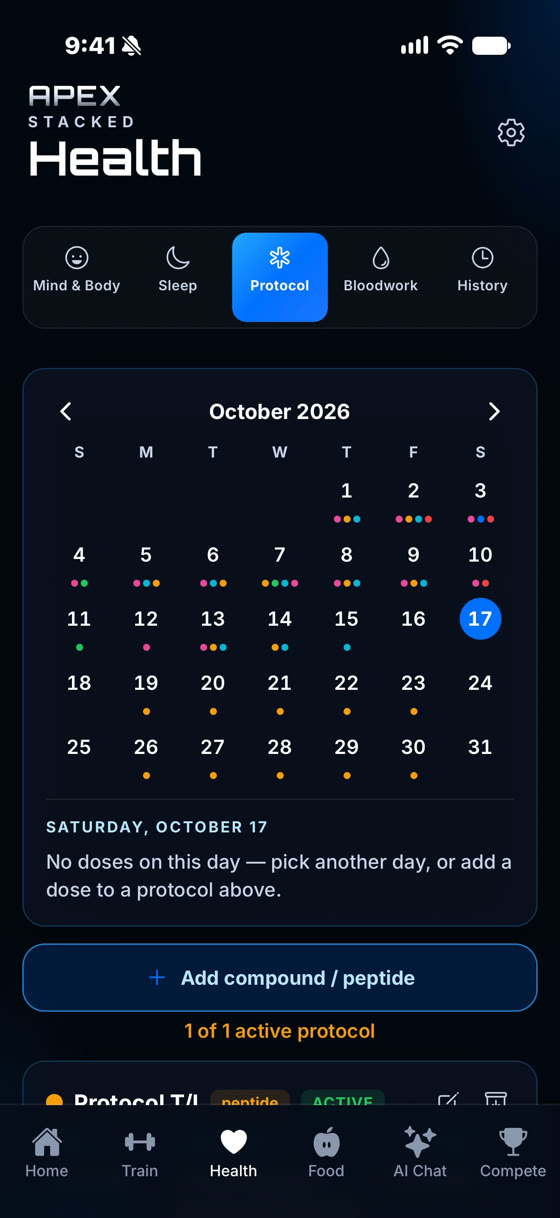
Track an existing TRT, peptide or supplement protocol in the same app as your training, food, sleep and bloodwork. Log each dose, get reminders on your schedule, and keep a full history. It's a tracking tool. It never tells you what to take.
iPhone, Apple Watch and Android. One active protocol free.

You enter the details. The app records them and keeps time.
TRT, peptide, supplement or other. A supplement protocol can be a single item or a whole stack, logged with one check-off.
Record the amount and unit you were given, with start and end dates, notes and a colour so each protocol is easy to spot.
Daily, twice daily, every other day, every 3 to 6 days, weekly, as needed, custom days, or phased schedules where the amount changes on dates you set.
Reminders match the schedule you set, including every-few-days cadences, and stop for the day once you log or skip that dose.
For vial-based protocols, see doses left and amount remaining, get a low-vial reminder, and tap Start new vial when you open the next one.
A protocol stays active until its end date, then moves to ended. Archive old ones so your list stays short and the history stays readable.
Mark a dose taken or skipped, log it at the scheduled time or the current time, or add one for a day you missed logging. Recent doses are listed on each protocol, and you can delete a mistaken entry.
FreeThe Apple Watch app shows today's doses so you can mark each one taken or skipped without opening your phone. Apple Watch
FreeProtocols live in the Health tab beside Bloodwork, Sleep and Mind & Body, and your workouts and food are one tab away.
Your protocols are kept in an on-device database that is always encrypted. There is no ad tracking.
Reminders can show only "Apex Stacked: You have a reminder" on your lock screen.
Require Face ID, fingerprint or passcode to open the app. While the lock is engaged, your watch shows no protocol data at all.
Watch complications never show protocol information, and nothing about your protocols is saved to the watch's storage.
Turn the Protocol section off to hide its tab, reminders and Today row and keep it out of the AI. Existing entries stay readable under History.
iCloud Backup on iPhone is optional and always encrypted, and covers protocols. Both platforms can export a copy to a file.
One active protocol, with dose logging, reminders, vial tracking, Apple Watch logging and your full history.
FreeNo limit on active protocols. Apex Pro is $2.99/month or $24.99/year. Apex Pro + AI is $8.99/month with a 7-day free trial and adds the AI coach and reports. If you downgrade, extra protocols are paused, not deleted.
Apex ProFull details: Pricing.
A good fit if you already follow a TRT, peptide or supplement protocol and want a private, accurate log of every dose, next to your bloodwork, training and sleep.
Not a fit if you're looking for advice on what to take, how much, or where to get it. Apex Stacked doesn't do any of that. Talk to your clinician.
Yes. Each protocol has a type: TRT, peptide, supplement or other. You enter the amount, unit and schedule you already follow, then log each dose as taken or skipped. Protocols sit in the Health tab next to your bloodwork, sleep and body metrics.
No. Apex Stacked records the protocol you enter. It does not recommend doses, schedules or protocols, and it never says where to get any substance. The AI coach follows the same rules: it will not suggest a dose, a change to your protocol, or a source. Dosing decisions belong to you and your clinician.
Yes, with one active protocol at a time on the free plan. Dose logging, reminders, vial tracking and your history are included. Apex Pro ($2.99/month or $24.99/year) and Apex Pro + AI remove the limit on active protocols. If a subscription lapses, nothing is deleted. Extra protocols are paused and come back when you upgrade. See pricing.
Only if you want them to. Turn on Discreet notifications and reminders show just "Apex Stacked: You have a reminder" on your lock screen. With Discreet notifications on, the Apple Watch labels each entry "Dose" with no name, amount or time.
Yes. The Apple Watch app shows today's scheduled doses and lets you mark each one taken or skipped. Watch complications never show protocol information, nothing about your protocols is saved to the watch's storage, and the dose list is hidden whenever your app lock is engaged.
Your protocols are stored in an encrypted database on your phone. There is no ad tracking. You can add an app lock with Face ID, fingerprint or passcode, and you can switch the whole Protocol section off, which also keeps it out of the AI coach. iCloud Backup on iPhone is optional and always encrypted.
Apex Stacked is a tracking tool for adults. It records the protocol you enter and does not prescribe, recommend or adjust doses, schedules or substances, or say where to obtain them. It makes no claim about the effects of any substance. It is not medical advice and does not replace care from a licensed clinician.