Bloodwork tracker
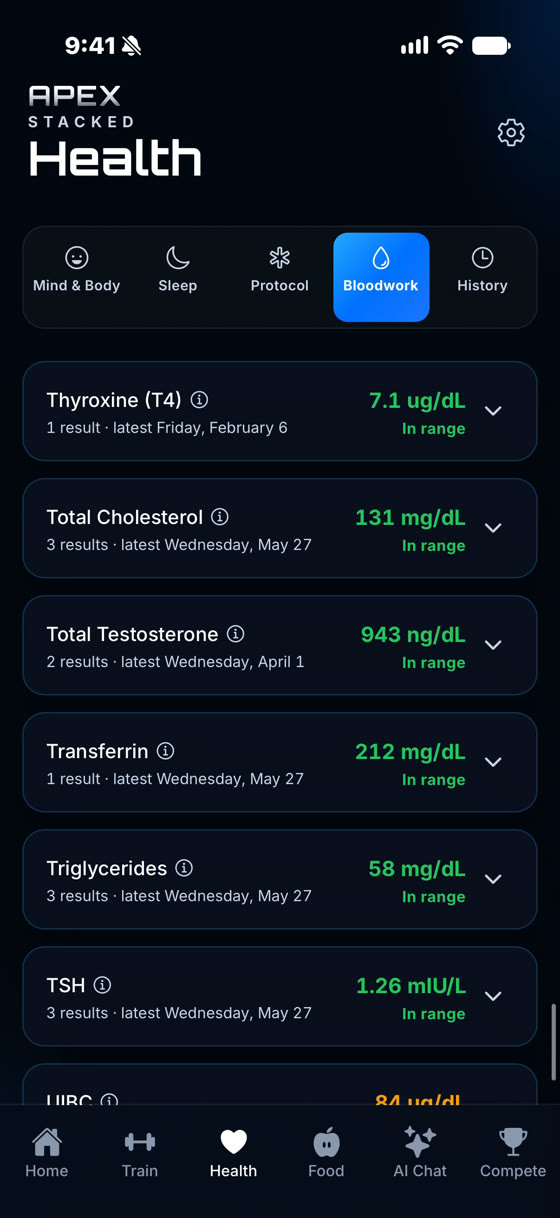
Keep your blood test results in one place and see how each marker moves from test to test. Type values in for free, or scan a lab report with your personal details blacked out on your phone first.
iPhone and Android. Manual entry is free.

Type in your values from the report, with the lab name and collection date. Pick from the built-in marker list or add a custom marker exactly as it appears on your report.
FreeTake photos, pick images from your library, or upload a PDF on iPhone. Add several pages, and the markers are read for you. Review and correct every value before you save.
Apex Pro + AIScanning sends an image of your report to be read. Identity details are removed on your phone first.
Add a second test and each marker gets a trend chart across your test dates, with every past result listed underneath.
Mixed units, such as nmol/L and ng/dL, are converted to one unit so the line stays continuous. Anything that can't be converted is shown as recorded and flagged.
Your lab's own printed range is used when it's on the report. Otherwise the app falls back to a built-in range, and flags values above or below it.
Hide a marker you don't care about, bring it back any time, and manage or delete individual tests.
Set your next bloodwork date and see a countdown, with a reminder and a Fasted flag.
Bloodwork sits in the Health tab beside Protocol, Sleep and Mind & Body. Peptide & TRT tracker
32 built-in markers with reference ranges, plus any custom marker you add.
Total testosterone, free testosterone, estradiol (E2), LH, FSH, SHBG, prolactin, DHEA-S and IGF-1.
Total cholesterol, LDL, HDL and triglycerides.
Glucose, HbA1c and insulin.
RBC, WBC, hemoglobin, hematocrit and platelets.
ALT, AST, creatinine, eGFR and PSA.
TSH, free T3 and free T4.
Tap the info button next to a marker for a short, plain-language description of what it measures. A built-in dictionary covers common markers with no network needed.
FreeFor a marker the dictionary doesn't know, the AI writes a plain-language description. Only the marker name is sent, never your value, and it needs bloodwork sharing with the AI turned on.
Apex Pro + AIExplanations describe what a marker generally measures. They never interpret your own value, diagnose, or recommend anything.
A good fit if you get regular blood tests and want a private record of your results, with trends you can follow next to your training, food, sleep and any protocol you log.
Not a fit if you want a diagnosis or medical interpretation of your results. Apex Stacked tracks and explains markers in general terms. Your clinician interprets them.
Yes. Entering results by hand, the built-in marker list, custom markers, in-range flags, trend charts, your full history and the next-test reminder are all free. Scanning a lab report needs Apex Pro + AI ($8.99/month with a 7-day free trial), or the Apex AI add-on ($5.99/month) on an Apex Pro plan. See pricing.
On iPhone, yes. A PDF is turned into page images on your phone and redacted like a photo before anything is sent. On Android, a PDF can't be redacted on the device yet, so it isn't sent. Take a screenshot or photo of each page instead. Photos and images from your library work on both.
They are blacked out on your phone before anything is sent. Text recognition on the device covers your name, date of birth, address, phone number, record and account numbers and the ordering physician. You check every page, and can draw extra boxes, before you confirm. If recognition finds nothing, you black out the details yourself.
The built-in list has 32 markers with reference ranges across hormones (including total and free testosterone, estradiol, LH, FSH and SHBG), CBC, metabolic, lipids (total cholesterol, LDL, HDL, triglycerides), organ health and thyroid. You can also add any custom marker exactly as it appears on your report.
It shows whether each value is inside or outside the reference range, and it can explain in plain language what a marker generally measures. It does not diagnose anything or interpret your results for you. For what a result means for your health, talk to your clinician.
Your results are stored in an encrypted database on your phone, with no ad tracking. Sharing bloodwork with the AI is a separate opt-in that starts off. Marker explanations send only the marker name, never your value. On Android, screenshots are always blocked on bloodwork screens.
Apex Stacked is a tracking and educational tool for adults. Reference ranges are general guidance only. Values read from a scan may be misread or missed, so always check them against your original lab report. The app does not diagnose, interpret your results, or recommend treatment. It is not medical advice. Talk to a qualified clinician about your results.