Guide
How to keep accurate records of a peptide protocol
Log every dose the moment it happens: the date and time, the amount exactly as prescribed, the product and lot, the injection site, whether you took or skipped it, and how you felt. Keep the schedule, vial or pen dates, and any side effects in the same place, so you can answer "did I take it?" in seconds and hand your clinician a clean summary.
This guide is about recordkeeping only. It does not tell you what to take, how much, or how to prepare anything. Those decisions belong to you and a licensed clinician.
Start with a legitimate prescription
A record is only as useful as what it describes. Some peptide medicines are FDA approved. Compounded drugs are not FDA approved, and FDA has warned companies selling unapproved products falsely labeled "for research purposes" or "not for human consumption" [1]. FDA advises patients to get a prescription from their doctor and fill it at a state-licensed pharmacy [1]. A safe online pharmacy always requires a prescription, is licensed with a state board of pharmacy, and has a licensed pharmacist available to answer questions [2].
Why records matter
- Adherence. CDC advises taking medicines as directed on the label or as instructed by a doctor or pharmacist [3]. A log shows whether that is actually happening.
- Avoiding double doses. When you can't remember whether you took this week's dose, a timestamped entry settles it. If you are unsure what to do after a missed dose, ask your pharmacist or prescriber rather than guessing [3].
- Spotting patterns. Notes on sleep, appetite, energy or site reactions are easier to judge across weeks than from memory.
- Sharing with your clinician. CDC recommends keeping a list of all your medicines, vitamins and supplements and making sure your doctor knows about all of them [3].
- Catching errors. FDA has received adverse event reports, some requiring hospitalization, that may be related to dosing errors with a compounded injectable, including patients measuring doses incorrectly [1]. Writing the prescribed amount next to each entry makes a mismatch visible.
What to log for every dose
Keep each entry short and consistent. The same fields every time make the log easy to scan.
- Date and time you actually took it, not just the scheduled time.
- Amount, as prescribed. Copy it from the pharmacy label or prescription in the same unit printed there. Don't convert it.
- Product and lot. Name, strength as labeled, pharmacy, lot number and expiration date. Lot numbers matter if a product is ever recalled or you report a problem.
- Site for injectables, such as "abdomen, left."
- Status: taken or skipped, with a reason for a skip ("traveling," "clinician paused").
- Notes on how you felt, anything unusual, and any site reaction.
An example log
| Date and time | Amount | Product and lot | Site | Status | Notes |
|---|---|---|---|---|---|
| Mon, morning | As prescribed | [Product], lot [from label] | Abdomen, left | Taken | Slept well, no site redness |
| Thu, morning | As prescribed | [Product], lot [from label] | Abdomen, right | Taken | Mild nausea after lunch |
| Mon, evening | As prescribed | [Product], lot [from label] | None | Skipped | Clinician asked to hold this week |
Keep the schedule and reminders in one place
Write down the schedule exactly as your prescriber gave it, including start and end dates and any planned change on a specific date. Set a reminder that matches it. The best reminder stops once you have logged or skipped the dose, so a stale alert never tempts you into taking it twice.
If you log a dose late, record the real time you took it. If you forgot to log a day, add a backdated entry and note that it was added later.
Track vial and pen start dates
For each vial or pen, record the date you opened it, the lot number, the expiration date and the storage instructions from the label. Keep a running count of doses taken from it so you know when a refill is due. Ask your pharmacist how long it stays usable once opened, and write that answer down rather than relying on memory. When you start a new one, log it as a new entry so the lot number on every dose stays correct.
Record injection sites
MedlinePlus patient instructions for subcutaneous injections say to change your injection site from one injection to the next [4]. Instructions for insulin injections suggest keeping a chart of places you have used so you don't inject in the same place all the time, and asking your provider for one [5]. Follow the site guidance in your own medication's instructions, and log the site with every dose so the pattern is visible.
Note side effects and report them
When something feels off, write down what happened, when it started, how long it lasted and the dose entry it followed. Bring it to your clinician, and seek urgent care for anything severe.
You can also report side effects and product quality problems to FDA through MedWatch, which is open to patients and consumers as well as health professionals [6]. FDA specifically encourages patients to report adverse events or quality problems with compounded drugs [1]. Your log, with its lot numbers and dates, makes that report accurate.
Dispose of sharps safely
FDA says to place needles and other sharps in a sharps disposal container immediately after use, keep it away from children and pets, and not overfill it [7]. Disposal rules vary by location, so check with your local trash service or health department. Options may include drop-off sites, household hazardous waste collection and mail-back programs [7]. Note in your records when you start and dispose of a container.
Prepare a summary for appointments
A short summary is more useful to a clinician than a stack of raw entries. Before each visit, pull together:
- The current prescription and schedule as you understand it.
- Doses taken and skipped since the last visit, with reasons for skips.
- Side effects or site reactions, with dates.
- Products and lot numbers used, and any changes of pharmacy.
- Every other medicine, vitamin and supplement you take [3].
- Your questions, written down in advance.
Protect your health data
Protocol records are sensitive. If you use an app, the FTC suggests looking for a privacy notice that explains in simple terms what health information it collects, choosing more protective settings because defaults often encourage sharing, and keeping the app and your phone's operating system up to date [8]. On paper, keep the log somewhere private. Either way, consider whether reminders on your lock screen reveal more than you want.
How Apex Stacked helps
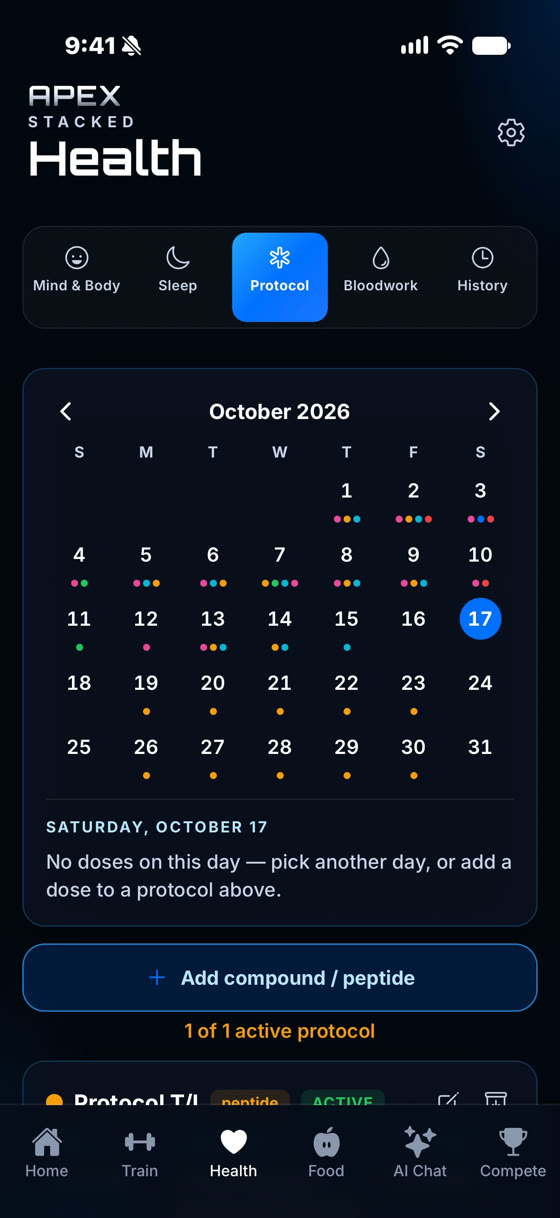
Apex Stacked is one way to keep these records. It records the protocol you enter and never tells you what to take.
- Protocol types: TRT, peptide, supplement or other, with the amount and unit you were given.
- Schedules: daily, every few days, weekly, custom days, or phased schedules where the amount changes on dates you set. Reminders follow the schedule and stop for the day once you log or skip that dose.
- Logging: mark each dose taken or skipped, and add one for a day you missed logging.
- Vial tracking: see doses left, get a low-vial reminder, and tap Start new vial when you open the next one.
- Discreet notifications: reminders can show only "Apex Stacked: You have a reminder" on your lock screen.
- Apple Watch: see today's doses and mark them from your wrist. Watch complications never show protocol information.
- Privacy: protocols are kept in an encrypted database on your phone. iCloud Backup on iPhone is optional and always encrypted.
- AI coach limits: the coach never recommends a dose, a protocol change or a source.
The free plan includes one active protocol. Apex Pro removes the limit. See the peptide and TRT tracker for details.
Health disclaimer. This guide is general information about keeping records. It is not medical advice and does not recommend any substance, dose or protocol. Use only medicines prescribed by a licensed clinician and dispensed by a licensed pharmacy, and ask your clinician or pharmacist about anything to do with dosing, storage or side effects.
Sources
- FDA. FDA's concerns with unapproved GLP-1 drugs used for weight loss.
- FDA BeSafeRx. Considering an online pharmacy?
- CDC. About medication safety.
- MedlinePlus. Subcutaneous (SQ) injections.
- MedlinePlus. Giving an insulin injection.
- FDA. MedWatch: The FDA safety information and adverse event reporting program.
- FDA. Best way to get rid of used needles and other sharps.
- FTC. Does your health app protect your sensitive info?